Part 2: Safety technology today · Chapter 4
How AI Video Safety Analytics Works
How AI video safety analytics turns CCTV into safety events: cameras, edge vs cloud processing, models, alert logic, accuracy, false positives and human review.
By LIPAI WANG · Updated · 19 min read · 17 sources · 2 figures
AI video safety analytics is software that watches camera feeds from a workplace, detects people, vehicles, equipment and conditions in each frame, and applies rules to flag unsafe acts or conditions such as a missing hard hat, a pedestrian inside a forklift aisle or a blocked fire exit. Most systems reuse a site's existing IP cameras, run the models on an on-site computer, and send short clips and statistics to a cloud dashboard where safety teams review events and track trends. This chapter explains each stage of that pipeline, where errors come from, and what a buyer should ask about accuracy, review and privacy.
Investment in the category has grown. Intenseye raised a $64 million Series B in February 2024 [14], Protex AI raised a $36 million Series B in February 2025 [16], and Voxel raised a $44 million Series B in June 2025 [15]. Video platforms built mainly for security, such as Verkada, Samsara and Spot AI, have added safety detections to their products [2][4][5]. Most of them follow a similar technical pattern, and knowing it makes vendor comparisons easier.
What are the parts of an AI video safety system?
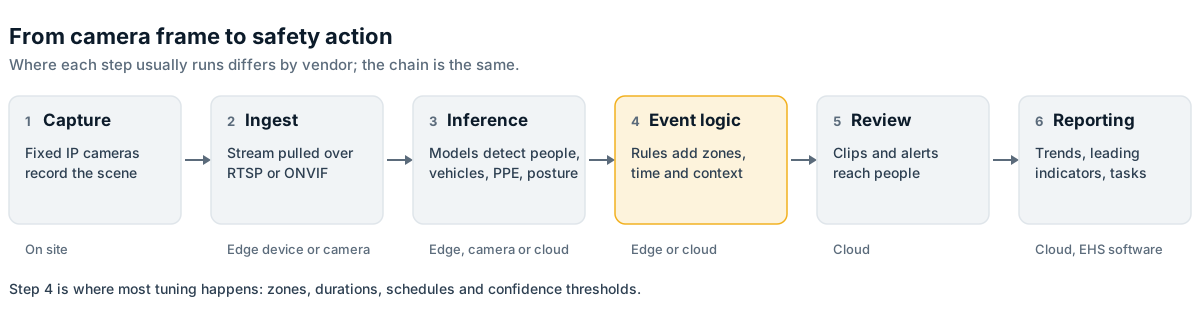
Every system in this category has the same basic chain. A camera captures video. A computer decodes the stream and runs one or more neural network models on the frames. Rule logic decides whether what the model saw counts as an event. The event is stored, sent to people who can act on it, and counted in reports. Vendors differ in where each step runs and how much of it they control.
| Stage | What happens | Typical location | Main questions for a buyer |
|---|---|---|---|
| Capture | Fixed IP cameras record the scene | On site | Is the hazard visible from current camera positions? |
| Ingest | Software pulls the stream over RTSP or ONVIF | Edge device or camera | Which camera makes and codecs are supported? |
| Inference | Models detect people, vehicles, PPE, posture, objects | Edge device, camera, or cloud | How many cameras per device? What frame rate is analyzed? |
| Event logic | Rules combine detections with zones, time and context | Edge or cloud | Who sets the rules, and can the site change them? |
| Review | Clips and alerts go to a dashboard or phone | Cloud | Who sees clips? Is anything blurred? |
| Reporting | Events become trends, leading indicators and tasks | Cloud, EHS software | Can data flow into existing EHS systems? |
Cameras and video streams
Most industrial sites already have closed-circuit television (CCTV) for security. Modern CCTV uses IP cameras, which send compressed digital video over a network. Software can request a live stream from these cameras using the Real Time Streaming Protocol (RTSP). Protex AI, for example, says it connects to existing fixed-position cameras over RTSP and processes the feed on an on-site edge device [1].
Camera and software interoperability rests largely on ONVIF, an industry forum that publishes "profiles" describing what conformant devices must support. Profile S and Profile T cover video streaming from network cameras, Profile G covers devices with local storage, and Profile M covers metadata and analytics [8]. A camera that conforms to Profile T or S should be able to deliver a stream to third-party analytics software, although in practice vendors still test specific camera models.
Camera placement usually matters more than camera brand. Security cameras are usually aimed at doors, perimeters and high-value areas. Safety use cases need views of forklift aisles, loading docks, machine guarding zones and walkways. A camera mounted high on a warehouse wall, looking down a long aisle, may show a forklift clearly but make a hard hat only a few pixels wide at the far end. Before a pilot, most vendors run a camera survey to decide which existing cameras can support which use cases and where new cameras are needed.
The edge device
The "edge" is computing that happens on site, close to the cameras, rather than in a remote data center. In AI video safety, the edge device is usually a small server with a graphics processing unit (GPU) that decodes several video streams and runs the detection models.
Visionify publishes an example specification for its edge server: an Intel Core i7 class processor, an NVIDIA RTX A4000 class GPU, 32 GB of memory and a 1 TB solid-state drive, handling up to 10 cameras [6]. Other vendors use different hardware, and some use small embedded modules. NVIDIA's DeepStream software development kit is one widely used toolkit for building these pipelines; it combines hardware-accelerated video decoding, model inference with TensorRT, object tracking and message output on NVIDIA GPUs and Jetson modules [7].
Some camera makers put the processing inside the camera itself. Verkada says its People Analytics feature uses edge-based processing on the camera to detect people and analyze attributes such as clothing color [3]. Spot AI describes a hybrid design in which an on-site "Intelligent Video Recorder" works with existing cameras and a cloud dashboard [5]. Samsara's Site Visibility product, launched in 2021, uses an on-site gateway to pull streams from existing cameras into its cloud platform [4].
Edge versus cloud processing
Where the models run affects cost, alert speed, bandwidth and privacy.
| Factor | Edge processing | Cloud processing |
|---|---|---|
| Network use | Low. Only events and metadata leave the site | High. Continuous video must be uploaded |
| Latency | Low. Alerts can fire within seconds | Depends on connection and queueing |
| Privacy | Full video can stay on site | More footage leaves the site |
| Hardware | Needs on-site devices, power, cooling and maintenance | Little on-site hardware |
| Model updates | Pushed to devices; some sites restrict this | Central and simple |
| Large or new models | Limited by on-site compute | Easier to run large models |
Most safety vendors now use a hybrid approach. Protex AI describes "local edge processing for speed and privacy" combined with a cloud platform for analytics and reporting [1]. Verkada describes video processing that happens both on its cameras and in back-end data centers [2]. In practice, the continuous live stream usually stays on site, while short clips, still images, detections and statistics travel to the cloud.
That design has consequences for IT teams. Edge devices need a network path to the cameras, an outbound connection to the vendor's cloud, physical space, power and someone responsible when one fails. Security teams will want to know how the device is patched, whether it accepts inbound connections and how camera credentials are stored.
How do the models detect safety risks?
Object detection
The core technology in almost every product is object detection: a neural network that looks at an image and returns a list of boxes, each with a class label (person, forklift, hard hat, high-visibility vest) and a confidence score between 0 and 1. The YOLO ("You Only Look Once") family of detectors, first published in 2016 and covered in Chapter 3, is a common starting point because it is fast enough to run on many streams at once.
Academic work gives a sense of how these models are built and evaluated. Ferdous and Ahsan, writing in PeerJ Computer Science in 2022, created a dataset of 1,699 construction site images labeled with eight classes, including four colors of hard hat, vests, safety glasses, person body and person head, and trained versions of the YOLOX detector on it [10]. Commercial vendors train on far larger proprietary datasets, but the principle is the same: the model learns from labeled examples, and it is only as good as the variety of scenes it has seen.
Tracking
A detector looks at single frames. A tracker links detections across frames so the system knows that the person in frame 100 is the same person in frame 101. Tracking makes it possible to measure how long someone has been in a zone, how fast a forklift is moving, which direction a vehicle is traveling, and whether a person and a vehicle are converging. Without tracking, a system can count objects but cannot reason about movement or duration.
Pose estimation
Pose estimation models locate body keypoints such as shoulders, elbows, hips and knees. Safety vendors use pose to estimate trunk bending, reaching and lifting posture for ergonomics, to detect a person lying on the floor after a fall, and to check whether a person on a ladder has three points of contact. Pose models are sensitive to occlusion: a worker partly hidden behind a pallet or a machine may produce unreliable joint positions.
Segmentation and scene understanding
Some use cases are about conditions rather than people. Spills, debris in walkways, blocked fire exits and stacked material in front of electrical panels require the model to understand regions of the image rather than discrete objects. Segmentation models label each pixel by class, or the system compares the current view against a reference image of the area when it was clear.
Vision-language models
A newer approach uses vision-language models, which accept an image and a text description and judge whether the description matches. Verkada introduced AI-powered alerts in September 2024. Users describe an event in everyday language, and Verkada's examples include "person driving a forklift and not wearing a hardhat" and "person carrying crates and not wearing a safety vest" [2]. Creating a new detection this way takes less effort, because no one has to collect and label training images first. It is also harder to check for consistency, because a natural-language rule is harder to validate than a model trained and measured on a fixed set of classes. Chapter 16 covers vision-language models in more depth.
How does a detection become a safety event?
A raw detection says "there is a person at these coordinates with confidence 0.83." A safety event says "a pedestrian entered the forklift-only zone at dock 4 while a forklift was moving within 3 meters." The step between the two is rule logic, and it is where most of the practical tuning happens.
Typical rule components include:
- Zones drawn on the camera image, such as pedestrian walkways, vehicle aisles, exclusion areas around machines, or the space in front of fire exits.
- Duration thresholds, so a person must be in a zone for a set number of seconds before an alert fires, which filters out brief crossings.
- Co-occurrence conditions, such as "person and moving vehicle in the same zone at the same time."
- Speed and direction thresholds for vehicles, which require the camera to be calibrated so pixels can be converted into real distances.
- Schedules, so a rule applies only during certain shifts or when a machine is running.
- Confidence thresholds on the underlying model output.
Each of these settings shifts the balance between catching every real event and avoiding nuisance alerts. Verkada exposes this trade-off directly with a slider that moves an alert between "More Precise," which produces fewer alerts, and "More Broad," which produces more [2]. Most safety platforms make similar adjustments, sometimes in the interface and sometimes through the vendor's customer success team.
Clips, alerts and dashboards
When a rule fires, the system usually saves a short video clip around the event. Protex AI says each clip is an anonymized, encrypted 10-second recording kept for review on its cloud platform, and that the live stream is processed on site and never stored [1]. The event is then routed in one or more ways:
- Immediate alerts by app notification, text message, email or a local device such as a light or horn, for events that need action now.
- A review queue in a web dashboard, where safety staff confirm or reject events and add notes.
- Aggregated reports and heat maps that show where and when events cluster, used in safety meetings and for planning engineering controls.
- Integration into EHS software as observations or incidents. Cority announced in November 2024 that Protex AI detections would flow into its CorityOne incident management solution [17].
Sites need to decide which events go to real-time alerts and which go to after-the-fact analytics. Often only a few event types justify interrupting a supervisor immediately. The rest are more useful as trend data that shows which areas, shifts or tasks generate the most risk.
How accurate is AI video safety analytics?
Precision, recall and why both matter
Two measures describe detection accuracy:
- Precision is the share of alerts that turn out to be real. If the system raises 100 PPE alerts and 80 show a worker actually missing PPE, precision is 80 percent.
- Recall is the share of real events the system catches. If 100 workers walked through a zone without a vest and the system flagged 70, recall is 70 percent.
They move in opposite directions. Lowering the confidence threshold or shortening a duration rule catches more real events (higher recall) but also produces more false alerts (lower precision).
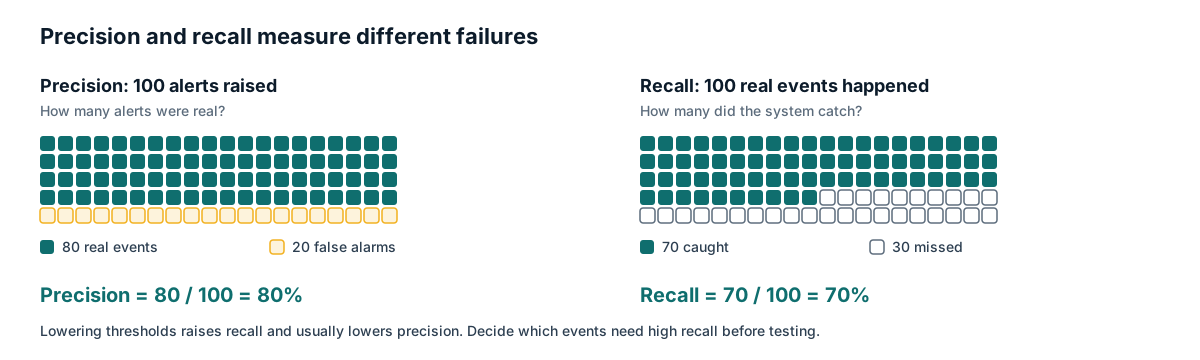
The two errors have different costs in safety work. A missed vehicle-pedestrian near miss may hide a fatal risk. A false PPE alert costs a few seconds of a reviewer's time, until there are hundreds of them a day and people stop looking. Buyers should decide, before testing, which event types require high recall and which can tolerate some misses in exchange for a cleaner review queue.
Why benchmark scores do not transfer
A model that scores well on a public dataset can perform much worse on a specific site. Common causes include:
- Viewing angle and distance. Small objects such as safety glasses, gloves or earplugs may be only a handful of pixels wide.
- Lighting. Glare from dock doors, low light on night shifts, flicker from older lighting and direct sunlight all change what the camera sees.
- Occlusion. Racking, machinery, vehicles and other workers block the view.
- Appearance differences. Uniforms, high-visibility colors, hard hat styles and site-specific PPE such as face shields or chemical suits may not match the training data.
- Camera quality and compression. Heavily compressed or low frame rate streams lose detail and blur motion.
- Weather and environment for outdoor sites, including rain, fog, dust and steam.
For these reasons, vendors usually fine-tune or configure models during onboarding and measure performance on the customer's own footage. A buyer should ask for that measurement in writing, per use case and per camera group, rather than accepting a single headline accuracy figure.
The false positive problem is older than AI
Nuisance alerts are a long-standing problem with automated safety warnings. A 2006 study by Todd Ruff at the National Institute for Occupational Safety and Health (NIOSH) evaluated a radar-based proximity warning system on off-highway dump trucks over two years. The system reliably detected small vehicles, people and other equipment, but alarms from objects that posed no immediate danger were common, and the author recommended combining sensors with cameras so operators could check the source of an alarm [11]. The same lesson applies to video analytics: a system that alerts too often teaches people to ignore it.
Measuring accuracy in a pilot
A practical pilot measurement looks like this:
- Choose a small number of use cases and cameras.
- Agree definitions in advance. For example, does a hard hat carried in the hand count as a violation?
- Collect a sample of footage and have people label the true events independently of the system.
- Compare system alerts with the human labels to estimate precision and recall for each use case.
- Track how both measures change as the vendor tunes rules over several weeks.
- Record reviewer workload: how many alerts per day, and how long each takes to review.
Chapter 14 covers pilot design and acceptance criteria in detail.
Why is human review still needed?
Even well-tuned systems produce some false alerts and miss some real events. Most vendors therefore include a human review step, carried out by the customer's safety team, by the vendor's own staff, or both. Review serves several purposes.
It filters false positives before they reach supervisors or reports. It adds context the model cannot see, such as whether a worker without a hard hat was in a designated break area or whether a forklift in a pedestrian zone had a spotter. It creates labeled examples that vendors can use to improve models. And it keeps decisions about people with people, which matters for worker trust and, in some jurisdictions, for legal compliance.
Human review also has limits. Reviewers get tired, apply rules inconsistently and can drift toward approving whatever the system shows. Sites that run review well usually write short guidelines for each event type, sample a portion of rejected alerts to check reviewer consistency, and track how long events wait before someone looks at them.
How do vendors handle privacy and worker identity?
Video of workers is personal data in many jurisdictions. Safety vendors have responded with technical controls, and buyers should understand what each one does.
| Control | What it does | Example vendor statements |
|---|---|---|
| Edge processing with no stream storage | Live video is analyzed on site and discarded | Protex AI says the live stream is never stored [1] |
| Event-only clips | Only short clips around detected events are kept | Protex AI describes anonymized 10-second clips [1] |
| Face blurring | Faces are obscured in stored or displayed footage | Intenseye says all footage undergoes automatic, irreversible face blurring [9] |
| Full-body blurring or removal | People are blurred or removed from the footage | Protex AI offers full-body blurring and "ghosting," which replaces people with a neutral background [1]; Intenseye says faces and bodies are masked in real time by default [9] |
| Videoless mode | No clips are retained, only event data | Protex AI describes a videoless option [1] |
| No facial recognition | Detection is based on posture and objects, not identity | Intenseye says detection is based on posture and motion, not identity [9] |
Technical controls do not settle the legal questions. In the UK, the Information Commissioner's Office (ICO) published guidance on monitoring workers in October 2023 that covers automated monitoring tools, transparency and when a data protection impact assessment (DPIA) is needed; the ICO notes the guidance is under review following the Data (Use and Access) Act [12]. In the European Union, the AI Act has prohibited emotion recognition in workplaces since 2 February 2025, with limited exceptions for medical or safety reasons, and the European Commission's implementation timeline now shows rules for high-risk systems listed in Annex III, which include certain employment uses, applying from 2 December 2027 after amendments made through the Digital Omnibus [13]. Chapter 13 covers privacy law, worker consultation and union agreements in detail.
What does a typical deployment look like?
Deployment steps vary by vendor, but a common sequence is:
- Site survey. The vendor and site review camera positions, network layout and target hazards. Gaps in coverage are identified.
- Network and security review. IT approves the edge device, its network access and its outbound connections.
- Hardware installation. Edge devices are installed and connected to camera streams. Visionify describes shipping a preconfigured edge server as an early step [6].
- Configuration. Zones, rules, schedules and alert recipients are set up for each camera.
- Calibration and tuning. The vendor reviews early alerts, adjusts thresholds and, where needed, fine-tunes models on site footage.
- Go-live and review routine. The site agrees who reviews events, how quickly, and what happens after confirmation.
- Reporting cadence. Event trends feed into toolbox talks, safety committee meetings and engineering changes.
The technical steps are often the quickest. The slower parts are usually agreeing data protection measures, consulting workers and their representatives, and building a routine where someone acts on what the system finds.
What are the main technical limitations?
AI video analytics can only see what the cameras see, so coverage gaps are blind spots. It struggles with small objects at distance, heavy occlusion and poor lighting. It detects visual patterns, so it cannot tell whether a worker has been trained, whether a lockout device is actually isolating energy, or whether a confined space atmosphere is safe. Proximity and speed measurements depend on calibration, and camera positions shift over time when they are bumped or re-aimed. Models trained in one sector may need significant adjustment for another.
A system that generates events no one acts on adds cost without reducing risk. Any benefit comes from the response: moving a walkway, changing a traffic plan, fixing a lighting problem, or coaching a team. Chapter 15 discusses how to measure whether that response is actually reducing harm, and why vendor-reported reductions should be treated as claims until independently checked.
How do vendor architectures compare?
The table below summarizes publicly stated architecture choices for several vendors. It reflects vendor descriptions, not independent testing.
| Vendor | Primary positioning | Stated architecture |
|---|---|---|
| Protex AI | Safety analytics on existing CCTV | RTSP from existing cameras, on-site edge device, encrypted event clips in cloud [1] |
| Intenseye | Safety analytics on existing cameras | Edge anonymization before data leaves the device, cloud platform [9] |
| Visionify | Safety analytics on existing CCTV | On-premises edge server for up to 10 cameras, cloud for storage and analytics [6] |
| Verkada | Cloud-managed security cameras with AI | Processing on cameras and in back-end data centers [2][3] |
| Samsara | Connected operations platform including site video | On-site gateway pulls existing camera streams into cloud [4] |
| Spot AI | Video intelligence on existing cameras | On-site Intelligent Video Recorder with cloud dashboard [5] |
The vendors fall into two broad groups. Safety-specialist vendors such as Protex AI, Intenseye, Voxel, Visionify, viAct and Buddywise focus their models and workflows on hazard detection, review and EHS reporting. Video platform vendors such as Verkada, Samsara and Spot AI start from security or fleet video and add safety detections to a broader product. Chapter 12 compares these groups and the trade-offs between them.
Summary
AI video safety analytics follows a consistent pipeline: cameras capture video, an edge device or camera runs detection, tracking and pose models, rule logic turns detections into events, and a cloud platform handles review and reporting. Most vendors work with existing IP cameras over RTSP and process video on site, sending only clips and metadata to the cloud.
Accuracy is site specific. Camera angle, lighting, occlusion and the way rules are tuned determine how many real events are caught and how many false alerts reach reviewers. Precision and recall trade off against each other, and buyers should decide in advance which events must not be missed. The nuisance alarm problem documented in earlier proximity warning research applies equally to video.
A working system also needs human review, privacy controls and clear governance. Vendors offer blurring, event-only clips and videoless modes, but legal obligations under data protection and AI regulation still fall on the employer. Whether any of this reduces harm depends on what the organization does with the events.
Frequently asked questions
+Do I need new cameras to use AI video safety analytics?
Usually not. Most vendors in this category, including Protex AI, Spot AI, Samsara and Visionify, say their software works with existing IP cameras. You may still need to add or move cameras if current coverage, angle or resolution does not show the hazard you want to monitor.
+Is the video sent to the cloud?
It depends on the vendor and configuration. Many systems analyze the live stream on an on-site edge device and send only short event clips, images or metadata to the cloud. Protex AI, for example, says the live stream is never stored and that only short, anonymized event clips are kept. Ask each vendor exactly what leaves the site, in what form, and for how long it is kept.
+How accurate are AI safety cameras?
There is no single accuracy figure that applies across sites. Results vary by use case, camera placement, lighting and how the alert rules are tuned. The only reliable way to know is to measure precision and recall on your own footage during a structured pilot.
+Does AI video analytics identify individual workers?
Most safety-focused vendors say they detect behaviors and conditions rather than identities, and several offer face or body blurring. Identification is a configuration and policy question as well as a technical one, so confirm in writing whether any facial recognition or person re-identification is used.
Related reading
- Buying and piloting40 questions to ask AI safety vendors: an RFP checklist
- Buying and pilotingAI safety pilot acceptance criteria: how to define pass and fail
- Privacy and data protectionDPIA for Workplace Video Analytics: A Step-by-Step Template for UK and EU Sites
- Cameras and infrastructureExisting CCTV Readiness Checklist: Can Your Cameras Run Safety Analytics?
- Forklift safetyForklift Pedestrian Safety Technology Compared: AI Video, Proximity Tags, Blue Lights and Radar
- Measuring outcomesLeading indicators for EHS dashboards: which ones are worth tracking
- Near missesNear-Miss Detection Explained: What AI Video Counts as a Close Call
- Buying and pilotingSafety technology ROI: building an honest business case
- BuyingWhat AI Search Tells Buyers About Safety Vendors, and How to Check It
- BuyingWhat AI Video Safety Vendors Publish for Buyers: A Public Evidence Check
Sources
- [1]Privacy at Protex AI
- [2]Introducing AI-Powered Alerts (Verkada, 2024)
- [3]People Analytics (Verkada Help Center)
- [4]Streamlining Operations: Announcing Site Visibility (Samsara, 2021)
- [5]Spot AI Closes $40 Million Series B (Spot AI, 2022)
- [6]How It Works (Visionify)
- [7]NVIDIA DeepStream SDK (GitHub)
- [8]ONVIF Profiles
- [9]Privacy (Intenseye)
- [10]Ferdous and Ahsan, PPE detector: a YOLO-based architecture to detect personal protective equipment for construction sites, PeerJ Computer Science (2022)
- [11]Ruff, Evaluation of a radar-based proximity warning system for off-highway dump trucks, Accident Analysis and Prevention (2006)
- [12]Employment practices and data protection: monitoring workers (ICO)
- [13]Timeline for the implementation of the EU AI Act (AI Act Service Desk, European Commission)
- [14]Intenseye Secures $64M Series B (Business Wire, 2024)
- [15]Voxel Raises $44M in Series B Funding (FinSMEs, 2025)
- [16]Protex AI Secures $36M Series B (Newsfile, 2025)
- [17]Cority and Protex AI Partner to Bring Real-Time AI-Driven Safety Insights to High-Risk Industries (Cority, 2024)
New chapters and updates, once a month
One email when we publish or update guidance. No vendor promotions. Unsubscribe any time.