Part 2: Safety technology today · Chapter 5
Core Use Cases for AI Safety Technology
Core AI safety use cases explained: PPE, vehicle-pedestrian separation, exclusion zones, near misses, ergonomics, slips and trips, fire, smoke and housekeeping.
By LIPAI WANG · Updated · 19 min read · 20 sources · 1 figure
The core use cases for AI safety technology are personal protective equipment (PPE) compliance, vehicle-pedestrian separation, exclusion zones, near-miss detection, ergonomics, slips and trips, fire and smoke, and housekeeping. Each one targets a specific way people get hurt at work, and each has different technical strengths and limits. This chapter explains what each use case detects, how it links to injury data and regulation, what tends to go wrong, and what to ask a vendor before relying on it.
Most AI video safety vendors offer some version of all eight. Intenseye, for example, says it detects more than 50 high-risk hazards, grouped into six families: area and line of fire, vehicle-pedestrian, falls from height, PPE, ergonomics and housekeeping [7]. Visionify lists detections ranging from PPE and forklift zone monitoring to fire, smoke, spills and blocked emergency exits [13]. The menus look similar across vendors. They differ in how well each detection works on a particular site and in how events are reviewed and acted on.
Which hazards cause the most serious harm?
A use case is worth the effort only if it addresses harm that actually happens. Injury statistics give a starting point.
In the United States, the Bureau of Labor Statistics (BLS) counted 5,070 fatal work injuries in 2024, down 4.0 percent from 2023. Transportation incidents were the most frequent fatal event at 1,937 deaths, or 38.2 percent of the total, and falls, slips and trips caused 844 deaths [1]. Transportation incidents in BLS data include roadway crashes as well as workers struck by vehicles and mobile equipment at work sites.
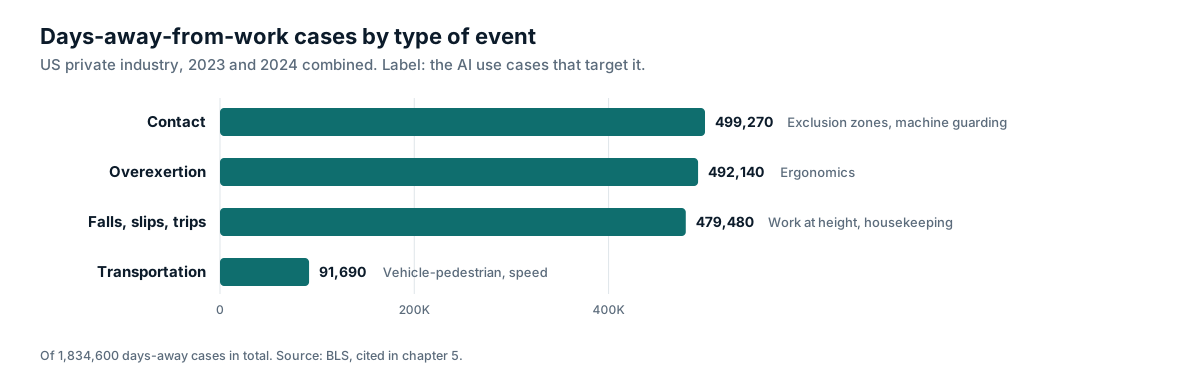
For non-fatal injuries, BLS data for private industry over 2023 and 2024 combined show 1,834,600 cases involving days away from work. Of these, 499,270 were contact incidents (such as being struck by or caught in objects and equipment), 492,140 were overexertion, repetitive motion and bodily conditions, 479,480 were falls, slips and trips, and 91,690 were transportation incidents [3].
In Great Britain, the Health and Safety Executive (HSE) reports 126 workers killed in work-related accidents in 2025/26 (provisional figures). The three most common causes were falls from height (31 deaths), being struck by a moving vehicle (24) and being struck by a moving object (21) [2].
| Hazard type | US fatal injuries 2024 [1] | US days-away cases 2023-24 [3] | GB fatal injuries 2025/26 [2] | Main AI use cases |
|---|---|---|---|---|
| Vehicles and mobile equipment | 1,937 transportation incidents (all types) | 91,690 transportation incidents | 24 struck by moving vehicle | Vehicle-pedestrian, exclusion zones, speed |
| Falls, slips and trips | 844 | 479,480 | 31 falls from height | Work at height, slips and trips, housekeeping |
| Contact with objects and equipment | Not broken out here | 499,270 | 21 struck by moving object | Exclusion zones, machine guarding, line of fire |
| Overexertion and bodily reaction | Rarely fatal | 492,140 | Rarely fatal | Ergonomics |
PPE detection is the most familiar use case, but vehicles, falls, contact with moving objects and overexertion drive most serious harm. A program that only monitors hard hats and vests may miss the risks most likely to cause a fatality or a long absence.
PPE compliance
What it detects
PPE detection checks whether people in a defined area are wearing required equipment. The most common items are hard hats and high-visibility vests, followed by safety glasses, gloves, hearing protection, face shields, harnesses and respirators. Rules can be set per zone, so a hard hat might be required in a construction area but not in a site office, and per time, so rules apply only when a machine is running.
Regulatory link
In the US, OSHA's general PPE standard requires employers to assess the workplace to determine whether hazards are present that require PPE, and to provide and maintain that equipment wherever it is necessary [4]. PPE detection does not satisfy those duties. It provides evidence about whether rules set after the hazard assessment are followed in practice.
Technical strengths and limits
Hard hats and vests are large, brightly colored and distinctive, so detectors handle them well when workers are reasonably close to the camera. Smaller items are harder. Safety glasses, earplugs and gloves may be only a few pixels wide from a ceiling-mounted security camera. Academic datasets show how models are built for this problem: Ferdous and Ahsan trained a YOLOX-based detector on 1,699 construction images labeled for four colors of hard hat, vests, safety glasses, person body and person head [18]. Including a "head" class lets the model distinguish a bare head from a hard hat rather than only finding hard hats.
Common sources of error include hard hats carried in the hand or clipped to a belt, hoods and winter hats that look like hard hats, workers facing away from the camera, and high-visibility clothing that differs from the training data. Defining edge cases in advance, such as whether a vest worn open counts as compliant, prevents disputes when results are reviewed.
Where it fits
PPE is the last line of defense in the hierarchy of controls described in Chapter 1. Monitoring PPE use is reasonable, especially where non-compliance is common, but buyers should be wary of a program that reports high PPE compliance as a sign that serious risks are under control. Vendor outcome claims in this area are often expressed as compliance improvement. Voxel, for example, says on its customer stories page that Carlex Glass improved PPE compliance in under three months [14]. Such figures are vendor reported and describe behavior change; they say nothing directly about injuries.
Vehicle-pedestrian separation
Why it matters
Forklifts, tuggers, reach trucks, yard tractors, loaders and other mobile equipment share space with people on foot in warehouses, ports, factories and construction sites. OSHA's powered industrial truck guidance notes that many pedestrians and bystanders are injured in forklift-related incidents, either struck directly or hit by falling loads, and recommends physical separation through walkways, railings or floor striping [5]. The OSHA forklift standard requires drivers to slow down and sound the horn at cross aisles and other locations where vision is obstructed, and requires training on pedestrian traffic where trucks operate [6].
What it detects
Vehicle-pedestrian use cases combine detection of people and vehicles with tracking, zones and sometimes speed estimation. Typical detections include:
- A pedestrian inside a vehicle-only aisle or a vehicle in a pedestrian walkway.
- A person and a moving vehicle within a set distance of each other.
- Vehicles exceeding a speed limit in a zone.
- Vehicles failing to stop at aisle ends, intersections or dock doors.
- Wrong-way travel and congestion at blind corners.
Intenseye lists forklift paths, over-speed, blind corners and dock conflicts in its vehicle-pedestrian family [7]. On its customer stories page, Voxel says Piston Automotive reduced forklift incidents by 86 percent in three months and Verst Logistics reduced vehicle incidents by 82 percent in five months [14]. Voxel reports these results itself; they have not been independently verified.
Technical strengths and limits
People and vehicles are large and well represented in training data, so basic detection is usually reliable. The harder parts are measurement and timing. Estimating distance and speed from a single camera requires calibration, and a view down a long aisle compresses distance, making two objects look closer than they are. Many near-collision events happen at blind corners, which is exactly where camera coverage tends to be poor.
Video systems also work after the fact unless they connect to something that can intervene. Most alert a supervisor or log an event; they do not stop the forklift. Systems that need to intervene in the moment often use wearable or vehicle-mounted proximity sensors, covered in Chapter 6. Some sites use both: proximity devices to warn in the moment and video analytics to understand where and why interactions happen.
Exclusion zones and line of fire
What it detects
Exclusion zone detection flags a person entering an area they should not be in. Examples include:
- The swing radius of an excavator or crane.
- The area under a suspended load.
- Robot cells and automated equipment.
- The danger zone around a press, conveyor or palletizer.
- Edges of loading docks and unprotected openings.
- Rail tracks, quay edges and yard lanes.
Some systems connect detections to machine controls. Intenseye says its system can stop a machine in about 0.8 seconds [7]. Any link from video analytics to machine control is a functional safety question. It should be reviewed by engineers against applicable machinery safety standards, and it should not replace engineered guarding or interlocks.
Technical strengths and limits
The detection itself is simple: a person inside a polygon drawn on the image. The difficulty is that two-dimensional zones on a camera image do not always match three-dimensional reality. A person standing beside a conveyor may appear inside the zone from a high camera angle. Suspended load detection must recognize the load and estimate the area beneath it as the load moves. viAct, a Hong Kong company that works mainly in construction and has expanded into the Middle East, monitors whether workers enter restricted zones [16].
Near misses
Definitions
OSHA's template near-miss reporting policy describes a near miss as a condition or incident with potential for more serious consequences, including unsafe conditions, unsafe behavior and minor incidents that could have been worse. The template treats near misses as a source of information about hazards and weaknesses in risk management that can be corrected before someone is hurt [8].
What AI adds
Manual near-miss programs depend on people choosing to report, and many near misses go unrecorded because they are embarrassing, seem minor or are simply not noticed. Video analytics can detect certain kinds of near misses automatically, mainly those involving vehicles and people, people and suspended loads, or people and moving machinery. This produces a much larger count of events than manual reporting, which can be useful for identifying patterns.
Cautions
An AI "near miss" is defined by rules: for example, a person and a forklift within 2 meters while the forklift is moving. That is a proxy for risk, not a direct measure. Different vendors, and different settings at the same vendor, can produce very different counts from the same footage. Before treating near-miss counts as a leading indicator, a site should agree definitions, check a sample of events by hand, and keep the definition stable over time so trends mean something. Chapter 15 covers how to use these counts without overstating what they prove.
Ergonomics
Why it matters
Overexertion, repetitive motion and bodily conditions accounted for 492,140 days-away-from-work cases in US private industry over 2023 and 2024 [3]. These injuries, mainly musculoskeletal disorders of the back, shoulders, wrists and knees, are among the most common causes of lost time and workers' compensation cost.
What it detects
Vision-based ergonomics uses pose estimation to locate body keypoints and calculate joint angles. Those angles can be scored using established observational tools such as RULA (Rapid Upper Limb Assessment) and REBA (Rapid Entire Body Assessment), which ergonomists have traditionally scored by hand from observation or video. Intenseye lists high-risk postures, heavy lifts, repetitive motions and trunk flexion among its ergonomic detections [7].
What the evidence says
A 2024 study in Scientific Reports benchmarked computer vision motion capture tools for ergonomic risk assessment in real manufacturing environments using a low-cost, two-dimensional RGB camera system. The authors found that accuracy varied with environmental conditions and workstation setup, and that such systems were not yet optimized for expert-level risk certification, although they offered potential for continuous posture monitoring [9].
That finding suggests a sensible role: video ergonomics can screen many tasks continuously and point an ergonomist to the jobs that deserve a closer look. It is less suited to producing a final risk score for a single task. Occlusion is the main technical obstacle, because workers at benches, in racking or behind equipment often have parts of their body hidden.
Video is not the only option for ergonomics. Wearable sensors, covered in Chapter 6, measure movement directly and are not affected by line of sight, but workers have to wear them.
Slips, trips and falls
What it detects
This use case covers two different things. The first is conditions that cause slips and trips, such as spills, wet floors, debris, cables and pallets in walkways. The second is detecting a fall after it happens, usually by recognizing a person lying on the floor or a sudden change in posture, so help can be sent quickly. Work at height detections, such as a person near an unprotected edge, working without a harness, or misusing a ladder, are related but target falls from height, which are far more likely to be fatal.
Regulatory link
OSHA's walking-working surfaces standard requires that workplaces, passageways and walking-working surfaces be kept clean, orderly and sanitary, and that surfaces be kept free of hazards such as spills, leaks, sharp or protruding objects, snow and ice [10].
Technical strengths and limits
Detecting a person on the floor is relatively reliable in open areas. Detecting spills is harder. Clear liquids on polished concrete may be nearly invisible to a camera, and reflections, shadows and floor markings create false alerts. Fall detection after the event is valuable for lone workers and quiet areas, but it is a response measure rather than prevention.
Fire and smoke
What it detects
Video-based fire detection looks for visual signatures of smoke or flame. Some safety analytics vendors include smoke and fire among their detections; Visionify, for example, says its system can detect fire and smoke in early stages [13].
How it relates to fire codes
Purpose-built video image detection (VID) is an established fire protection technology. The Society of Fire Protection Engineers explains that VID systems analyze changes in brightness, contrast, edge content, motion and color to identify smoke or flame, and that they can detect smoke anywhere in a camera's field of view rather than waiting for smoke to reach a ceiling detector. That suits large facilities with high ceilings and outdoor locations such as train stations and offshore platforms. The same source notes limits: most smoke VID systems need a minimum amount of light and will not work in the dark, and the camera windows must be kept clean, with the camera fixed and unobstructed. NFPA 72, the US National Fire Alarm and Signaling Code, recognizes video image smoke and flame detection and requires a performance-based design [12].
For buyers, a general safety analytics platform that flags smoke is an additional early warning. It is not a listed or approved fire detection system unless it has been designed, approved and installed as one. Fire detection obligations should continue to be met through the site's fire alarm system.
Housekeeping, blocked exits and access
What it detects
Housekeeping detections flag conditions rather than behaviors:
- Blocked fire exits and emergency routes.
- Material stored in front of electrical panels, fire extinguishers, eyewash stations or fire doors.
- Pallets, cartons and debris in walkways.
- Fire doors propped open.
- Missing fire extinguishers from their marked positions.
Intenseye lists spills, blocked exits, trip hazards and clutter in its housekeeping family [7].
Regulatory link
OSHA's exit route standard requires exit routes to be free and unobstructed, and prohibits placing materials or equipment, permanently or temporarily, within an exit route [11]. Because blocked routes can appear at any time of day, continuous checks complement periodic inspections.
Technical strengths and limits
Housekeeping detection usually compares the current view against a reference image of the area when clear, or uses segmentation to label floor area. It works best with fixed cameras and stable lighting. Problems arise when the "normal" state changes often, for example in a staging area where pallets are supposed to be present at certain times.
Other emerging use cases
Vendors continue to add detections. Common additions include mobile phone use while operating equipment or walking in vehicle areas, lone worker monitoring, smoking in restricted areas, unsafe ladder use, and open gates or barriers. Natural-language alerting on camera platforms, such as Verkada's AI-powered alerts, lets users describe new events in words, for example a person operating a forklift without a hard hat [15]. This makes it easier to try new use cases quickly but harder to validate them, because there is no fixed test set behind each description.
What does each use case need from the cameras?
Use cases place different demands on camera coverage, and a camera that works well for one may be useless for another.
PPE detection needs people to appear large enough in the frame for small items to be visible. That usually means cameras at moderate height, covering entrances, workstations and choke points where people pass close by, rather than wide views across a whole hall.
Vehicle-pedestrian and exclusion zone detection need wide views that show the whole interaction: the vehicle, the person and the space between them. Intersections, aisle ends, dock doors and blind corners are the priority. Speed and distance measurement also need cameras that stay fixed once calibrated.
Ergonomics needs a clear side or front view of the worker's whole body during the task, at a consistent angle. Overhead security cameras rarely provide that, so ergonomic programs often use dedicated cameras or short recordings made with a phone or tablet for a specific task.
Housekeeping and blocked exit detection need a stable view of a fixed area, such as an exit door, a fire extinguisher position or an electrical panel, with consistent lighting.
Fire and smoke detection needs views of the spaces where a fire is most likely to start and enough light for smoke to be visible, unless the camera is designed for low light or uses thermal imaging.
A camera survey before a pilot should list each candidate use case against each camera and mark whether the view is suitable, needs adjustment, or requires a new camera. This list often changes the order in which use cases are deployed.
How do the use cases compare?
| Use case | Typical detection reliability | Severity of harm addressed | Main technical risks | Best paired with |
|---|---|---|---|---|
| PPE (hard hats, vests) | Higher | Low to moderate | Small items, carried PPE, look-alikes | Hazard assessment, supervision |
| PPE (glasses, gloves, hearing) | Lower | Low to moderate | Very small objects, distance | Spot checks |
| Vehicle-pedestrian | Higher for presence, lower for distance and speed | High | Calibration, blind corners | Physical separation, proximity sensors |
| Exclusion zones | Higher | High | 2D zones versus 3D reality | Engineered guarding, interlocks |
| Near misses | Depends on definition | High | Inconsistent definitions | Manual reporting, investigations |
| Ergonomics | Moderate | Moderate, high cost | Occlusion, camera angle | Ergonomist review, wearables |
| Slips and trips | Moderate for objects, lower for liquids | Moderate | Reflections, clear spills | Cleaning routines |
| Work at height | Moderate | Very high | Distance, harness visibility | Fall protection planning |
| Fire and smoke | Variable | Very high | Lighting, not a listed system | Fire alarm system |
| Housekeeping and exits | Higher with fixed views | Moderate to high in emergencies | Changing "normal" states | 5S and inspections |
Reliability ratings in this table are general guidance based on the technical factors described above, not results from independent testing. Actual performance must be measured on site.
How should a site choose which use cases to deploy?
A practical selection process has four steps.
First, start from risk. Review injury records, near-miss reports, insurer loss data and risk assessments to identify the hazards most likely to cause serious injury or fatality. Match use cases to those hazards rather than to a vendor's menu.
Second, check visibility. For each candidate use case, confirm that cameras can actually see the hazard at a useful size and angle. A use case that needs a camera the site does not have becomes a hardware project.
Third, decide the response before going live. For each event type, agree who receives it, how fast they must respond, and what action follows. Some events need an immediate radio call; others belong in a weekly review. If no one will act on a type of event, do not turn it on.
Fourth, limit the initial scope. Two or three use cases run well usually achieve more than ten that flood reviewers. In its February 2025 funding announcement, Protex AI said customers see an average 64 percent reduction in risk within three months of deployment [20]. That is a company figure, and the announcement does not say how "risk" was measured. Ask any vendor whether such figures count fewer detected events or fewer injuries, and set a site baseline before deployment so you can judge any change yourself.
What about alert fatigue?
Every use case adds alerts. Alert fatigue, where people stop responding because they receive too many alerts, is a known failure mode for automated warnings. A NIOSH evaluation of a radar-based proximity warning system on mining haul trucks found that alarms from objects posing no immediate danger were common, even though the system reliably detected real hazards [19]. Video analytics faces the same risk. Sites can manage it by limiting real-time alerts to the highest-severity events, routing the rest to periodic review, measuring precision for each event type, and turning off or retuning detections that mainly produce noise.
How do use cases relate to privacy?
Some use cases are more sensitive than others. Housekeeping and blocked exits rarely involve people at all. PPE and vehicle-pedestrian detection involve people but focus on conditions and movements. Ergonomics, fall detection and lone worker monitoring involve close analysis of individual bodies and behavior. Many vendors offer face and body blurring; Protex AI, for example, describes face blurring, full-body blurring and silhouette options applied before event footage leaves the site [17]. Chapter 13 covers how data protection law, worker consultation and union agreements affect which use cases an employer can deploy and how.
Summary
The eight core use cases (PPE, vehicle-pedestrian separation, exclusion zones, near misses, ergonomics, slips and trips, fire and smoke, and housekeeping) each map to real injury patterns. US and UK statistics show that vehicles, falls, contact with moving objects and overexertion cause most serious harm, so these deserve priority over PPE alone.
Each use case has its own technical profile. People, vehicles, hard hats and vests are detected reliably in good conditions. Small PPE items, distance and speed estimation, posture under occlusion, clear liquid spills and smoke in poor lighting are harder. Near-miss counts depend on how a near miss is defined. Fire detection from general safety analytics supplements a fire alarm system and does not replace it.
Choosing use cases should start from the site's own risk profile and camera coverage, with a clear plan for who responds to each event. Vendor outcome figures are useful as claims to test, and the most reliable evidence comes from measuring results against a baseline the site sets before deployment.
Frequently asked questions
+Which AI safety use case should we start with?
Start with the hazard most likely to cause serious injury at your site, provided cameras can see it clearly. In warehouses and logistics that is often vehicle-pedestrian interaction; in construction it may be exclusion zones and work at height. PPE detection is easy to understand but usually addresses lower-severity risk.
+Can AI cameras detect all types of PPE?
Hard hats and high-visibility vests are the most reliable because they are large and distinctive. Safety glasses, gloves, earplugs and respirators are harder because they are small, vary in appearance and are often hidden by angle or distance. Ask vendors for results per PPE type on your own footage.
+Can video analytics replace a fire alarm system?
No. NFPA 72 recognizes video image smoke and flame detection, but such systems require performance-based design and approval as part of a fire alarm system. General-purpose safety analytics that flag smoke or fire should be treated as an additional early warning, not a replacement for listed detection.
+Are ergonomic assessments from video as good as an ergonomist?
Not yet in all conditions. Peer-reviewed validation work from 2024 found that computer vision ergonomic tools can support continuous monitoring but that accuracy varies with workstation setup and environment, and they are not yet suited to expert-level risk certification.
Related reading
Sources
- [1]National Census of Fatal Occupational Injuries in 2024 (BLS, February 2026)
- [2]Work-related fatal injuries in Great Britain (HSE)
- [3]Employer-Reported Workplace Injuries and Illnesses, 2023-2024, Table 2 (BLS, January 2026)
- [4]29 CFR 1910.132 General requirements, Personal Protective Equipment (OSHA)
- [5]Powered Industrial Trucks eTool: Pedestrian Traffic (OSHA)
- [6]29 CFR 1910.178 Powered industrial trucks (OSHA)
- [7]Real-Time AI Safety Solutions for SIF Prevention (Intenseye)
- [8]Template for Near Miss Reporting Policy (OSHA)
- [9]Validation of computer vision-based ergonomic risk assessment tools for real manufacturing environments, Scientific Reports (2024)
- [10]29 CFR 1910.22 Walking-working surfaces, general requirements (OSHA)
- [11]29 CFR 1910.37 Maintenance, safeguards, and operational features for exit routes (OSHA)
- [12]Flame and Smoke Video Image Detection (Society of Fire Protection Engineers)
- [13]Vision AI for Workplace Safety (Visionify)
- [14]Customer Stories (Voxel)
- [15]Introducing AI-Powered Alerts (Verkada, 2024)
- [16]Hong Kong AI monitoring firm viAct is on a mission to stop workplace accidents (Tatler Asia)
- [17]Privacy at Protex AI
- [18]Ferdous and Ahsan, PPE detector: a YOLO-based architecture to detect personal protective equipment for construction sites, PeerJ Computer Science (2022)
- [19]Ruff, Evaluation of a radar-based proximity warning system for off-highway dump trucks, Accident Analysis and Prevention (2006)
- [20]Protex AI Secures $36M Series B (Newsfile, 2025)
New chapters and updates, once a month
One email when we publish or update guidance. No vendor promotions. Unsubscribe any time.