Part 2: Safety technology today · Chapter 7
EHS Software, Data and Integrations
What EHS software does, how safety data is structured and reported, how video and wearable data integrate, and what to check in AI features and data governance.
By LIPAI WANG · Updated · 19 min read · 21 sources · 1 figure
EHS (environment, health and safety) software is the system of record where organizations log incidents and near misses, run inspections and audits, assign and track corrective actions, manage training and permits, and produce regulatory reports. AI video analytics and connected wearables generate new streams of safety data, but in most organizations those streams only lead to action once they reach the EHS platform and its workflows. This chapter explains what EHS software does, how safety data is structured, how integrations work, and what to check in the AI features that EHS vendors now offer.
Chapter 2 traced how EHS software grew from paper logs and spreadsheets into cloud platforms. This chapter covers the platforms as they are now: modules, data, regulatory outputs and links to newer technology.
What does EHS software do?
Most EHS platforms are built from modules that share a common database of people, locations, assets and organizational units. The core modules are similar across vendors.
| Module | Purpose | Typical records |
|---|---|---|
| Incident management | Record and investigate injuries, illnesses, damage and near misses | Incident reports, investigations, root causes, regulatory classification |
| Observations and hazard reporting | Capture unsafe acts and conditions before harm occurs | Observations, hazard reports, safety walks |
| Inspections and audits | Run checklists and audits on a schedule | Completed checklists, findings, scores |
| Corrective and preventive actions (CAPA) | Assign, track and verify fixes | Actions, owners, due dates, verification |
| Risk assessment | Document hazards and controls by task or area | Job hazard analyses, risk registers |
| Training and competence | Track who is trained and certified for what | Courses, completions, expiry dates |
| Permits to work | Control high-risk work | Hot work, confined space and lockout permits |
| Chemical management | Manage safety data sheets and inventories | SDS records, chemical inventories |
| Occupational health | Manage medical surveillance and case management | Exams, exposures, restrictions |
| Environmental compliance | Track emissions, waste, permits | Monitoring data, permit conditions |
| Reporting and analytics | Dashboards and regulatory outputs | Rates, trends, regulatory forms |
Some vendors cover all of these; others focus on a subset. Some products started in one area, such as inspections on mobile devices, and expanded outward.
Examples of EHS software vendors
The vendors below are examples of the range in the market. Descriptions are based on each company's own materials.
Intelex, which joined Fortive in 2019 [21], describes a platform for EHS, quality and sustainability management covering health and safety, environment, quality, risk and ESG. It says more than 1,400 organizations use its software [6].
Cority describes CorityOne as an "EHS+" platform combining people, data and AI agents, with embedded AI it calls Cortex AI and an industrial ergonomics product that uses AI motion capture [7].
VelocityEHS describes its Accelerate platform as a connected EHS platform with AI, mobile access and analytics. It says it serves more than 15,000 EHS teams and lists industrial ergonomics tools including AI-based motion capture, from its 2021 acquisition of Kinetica Labs [8].
EHS Insight describes a single platform with modules for audits, compliance, incidents, training, chemicals, claims and safety drills, a mobile app that works offline, and a Model Context Protocol (MCP) connector that it says lets general AI assistants work with platform data [9].
SafetyCulture, founded in 2004 by Luke Anear as SafetyDocs and known for the iAuditor inspection app it introduced in 2012, now brands its platform as Mitti by SafetyCulture, and safetyculture.com redirects to mitti.com. It says the platform has more than 2 million users across 80,000 organizations [10].
Benchmark Gensuite, based in Mason, Ohio, describes a unified EHS, sustainability and quality platform with embedded AI it calls Genny AI. It says it serves more than 8 million workers globally [11], and lists computer vision for identifying visible hazards and PPE observations among Genny AI's capabilities [20].
These figures are vendor claims. The products differ in depth by module, configuration effort, mobile experience, pricing model and target customer size. Chapter 12 discusses how to compare them.
How is safety data structured?
Master data
Every EHS record refers to a set of shared reference data, sometimes called master data:
- People: employees, contractors and visitors, usually with employee ID, job title, department and supervisor.
- Locations: a hierarchy from company to region, site, building, area and sometimes specific workstation or camera zone.
- Organizational units: business units, cost centers and reporting lines.
- Assets: equipment, vehicles and machines.
- Taxonomies: lists of incident types, injury types, body parts, root causes, hazard categories and severity levels.
Many reporting problems start with master data. If one site calls an area "Dock 3" and another calls a similar area "Loading Bay C," cross-site trends become unreliable. If contractors are not in the people list, their injuries may be recorded inconsistently. Cleaning up master data is usually the first and least visible step in any EHS software project, and it becomes more important when automated data sources are added.
Incidents and their classification
An incident record usually captures what happened, where, when, who was involved, the injury or damage, immediate actions, the investigation, root causes and corrective actions. It also carries regulatory classifications that determine what must be reported to whom.
In the US, OSHA's recordkeeping rules decide whether an injury or illness is recordable and how it appears on the OSHA Form 300 log, the Form 300A annual summary and the Form 301 incident report. In Great Britain, the Reporting of Injuries, Diseases and Dangerous Occurrences Regulations (RIDDOR) set out which injuries, occupational diseases and dangerous occurrences must be reported to the HSE, which accepts reports online or by telephone [3]. EHS software usually includes logic to help users classify cases, but final judgments about recordability or reportability still need a trained person.
Observations and leading indicators
Observations and hazard reports are far more numerous than incidents in a healthy reporting culture. They record unsafe conditions, unsafe acts, good practices and near misses. These records, together with inspection results, training completions and corrective action closure rates, form the leading indicators that OSHA encourages employers to use. OSHA describes leading indicators as proactive and preventive measures that show whether safety activities are effective, and lagging indicators as backward-looking measures such as injury and illness rates [5].
ISO 45001, the international standard for occupational health and safety management systems first published in 2018, requires organizations to monitor, measure, analyze and evaluate their OH&S performance [4]. EHS software is where most organizations hold the evidence for that requirement.
How does EHS software handle regulatory reporting?
OSHA electronic submission
Under 29 CFR 1904.41, certain US establishments must submit injury and illness data to OSHA electronically each year. Establishments with 20 to 249 employees in designated industries, and those with 250 or more employees in any industry covered by recordkeeping, submit the Form 300A summary. Establishments with 100 or more employees in industries listed in Appendix B to Subpart E submit information from Forms 300 and 301 as well [2]. That last requirement came from a rule published in July 2023. The regulation requires a legal company name in the submission and excludes employee names and addresses from the case-level data [2].
OSHA's Injury Tracking Application (ITA) accepts data in three ways: manual web entry, CSV file upload, and an application programming interface (API) for automated submission. The regular deadline is March 2 for the previous calendar year [1]. EHS platforms differ in how well they support this. Some produce a CSV in the right format; others submit through the API. Buyers with many establishments should check which method a vendor supports and how establishment mapping is handled.
Rates and benchmarks
EHS software calculates standard rates from case counts and hours worked. The total recordable case rate is the number of recordable cases multiplied by 200,000 and divided by total hours worked, which expresses cases per 100 full-time workers per year. The days away, restricted or transferred (DART) rate uses the same formula for cases involving those outcomes. BLS publishes national rates for comparison; in 2024, private industry employers reported a total recordable case rate of 2.3 cases per 100 full-time equivalent workers [18].
Hours worked are often the weakest input. They usually come from payroll or HR systems, and contractor hours may be missing or estimated. Integrating hours data from HR systems, rather than typing totals each month, is one of the most useful and least glamorous integrations an EHS team can make.
How do AI video and wearables connect to EHS software?
Why integration matters
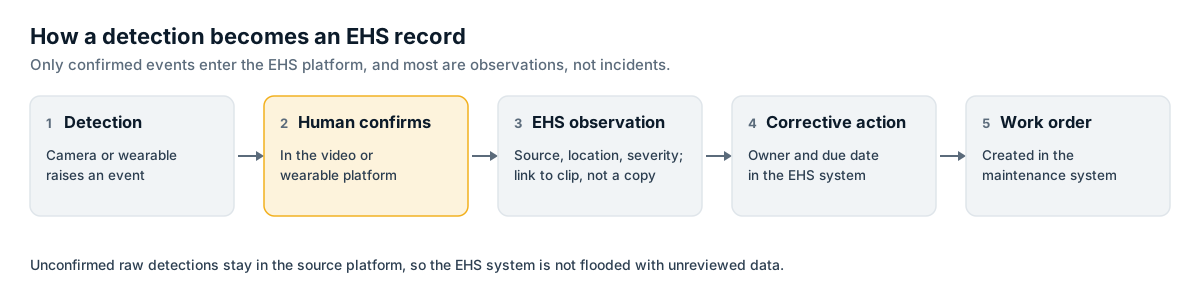
AI video analytics and wearables generate events. EHS software manages responses. If the two are not connected, safety teams end up checking two or three dashboards, copying events by hand, or ignoring one of the systems. Integration lets an event from a camera or wearable become an observation, a hazard report or an investigation, with an owner and a corrective action.
Published partnerships
Some vendors have announced integrations publicly. Cority announced a partnership with Protex AI in November 2024 under which Protex AI's computer vision detections flow into CorityOne's incident management solution [12]. Protex AI says it integrates with EHS systems including Intelex and EcoOnline, sending event data and short anonymized clips for reporting and review [13]. Benchmark Gensuite describes computer vision capabilities within its own platform [20]. Blackline Safety offers an API library for its connected wearables platform [14].
Common integration patterns
| Pattern | How it works | Good for | Watch for |
|---|---|---|---|
| Native connector | Vendors build and maintain a direct integration | Quick setup, supported by both vendors | Only covers the fields both vendors chose |
| API push | Source system sends events to the EHS platform's API | Near real-time flow of confirmed events | Error handling, rate limits, authentication |
| Webhook | Source sends a notification when an event occurs; EHS system fetches details | Lightweight, event driven | Requires a receiving endpoint and monitoring |
| Scheduled export | Daily or weekly files exported and imported | Simple, works with older systems | Delays, duplicate handling |
| Data warehouse | Both systems feed a central warehouse; reports join data there | Cross-system analytics | Not useful for workflows such as assigning actions |
Mapping events to records
The central integration decision is how automated events map to EHS records. A few principles help:
- Treat most automated detections as observations, not incidents. An AI-detected PPE non-compliance or near miss is a hazard observation unless someone was hurt or property was damaged.
- Integrate confirmed events only. Sending every raw detection into the EHS platform floods it with unreviewed data. Most sites send events after a human has confirmed them in the video or wearable platform.
- Link, do not copy, video. Store a link to the clip in the video platform rather than copying footage into the EHS system, so retention and access rules stay in one place.
- Keep the source visible. Records should show whether they came from a person, a camera or a sensor, so trend analysis can separate them.
- Map locations precisely. A camera's zone should map to a location in the EHS hierarchy so events appear in the right site and area.
- Agree severity mapping. A vendor's "high risk" label may not match the EHS platform's severity scale.
Why automated data changes trend analysis
Automated sources produce far more events than manual reporting. A single camera can generate hundreds of PPE or zone events in a week. If these flow into the same observation counts as manual reports, leading indicator charts will jump when cameras are installed, even if nothing about actual risk has changed. Separate reporting streams, stable definitions and baselines measured before deployment avoid this misreading. Chapter 15 covers attribution and baselines in more depth.
What other systems should EHS software integrate with?
Beyond safety technology, EHS platforms depend on business systems for accurate data.
| System | Data exchanged | Why it matters |
|---|---|---|
| Human resources information system (HRIS) | People, job titles, departments, hours worked | Accurate people records and rate calculations |
| Identity provider | Single sign-on and user provisioning | Security and simple access for frontline staff |
| Learning management system | Training completions and certifications | Competence checks before permits or tasks |
| Computerized maintenance management system | Work orders for equipment fixes | Corrective actions that need maintenance work |
| Enterprise resource planning | Cost centers, assets, procurement | Cost tracking and asset links |
| Contractor management | Contractor companies, workers, prequalification | Contractor safety records |
| Business intelligence tools | Cleaned EHS data for enterprise reporting | Executive dashboards and joins with operational data |
| Regulatory portals | OSHA ITA, other agency submissions | Compliance reporting |
A corrective action that needs a guardrail repaired, for example, is more likely to be completed if it automatically creates a work order in the maintenance system than if it waits in an EHS queue that maintenance teams never open.
What AI features do EHS platforms offer?
EHS vendors have added AI features at several levels. They are worth understanding separately because they carry different risks.
Classification and text analysis
The earliest AI features classify free-text descriptions of incidents and observations into categories, suggest root causes, or flag reports that mention serious injury potential. These features save time and can make large observation datasets usable. They can also misclassify, so a sample of automated classifications should be checked regularly.
Computer vision inside EHS platforms
Some EHS vendors now include computer vision directly. Cority and VelocityEHS describe AI motion capture for ergonomic assessments [7][8], and Benchmark Gensuite describes computer vision capabilities in Genny AI [20]. These are usually task-based tools, where a user records a short video of a job and receives an ergonomic score, rather than continuous CCTV analytics. The accuracy considerations from Chapters 4 and 5 still apply.
Assistants and agents
The newest features are generative AI assistants that answer questions about EHS data, draft investigation summaries, suggest corrective actions or prepare reports. Cority describes AI agents within CorityOne [7]. EHS Insight describes an MCP connector for general AI assistants [9]. Protex AI, on the video analytics side, launched a generative AI tool it calls Protex Copilot for safety analysis [19].
These tools can save time on writing and searching. They also raise specific questions:
- Accuracy: Does the assistant cite the records it used, so answers can be checked?
- Data use: Is customer data used to train the vendor's models, and can that be switched off?
- Access control: Does the assistant respect the same permissions as the user, so it cannot reveal occupational health records to someone without access?
- Auditability: Are prompts and outputs logged, especially when they feed investigation reports or regulatory decisions?
- Responsibility: Who reviews AI-drafted root causes and corrective actions before they are approved?
An AI-drafted investigation summary should be treated as a draft. Investigations carry legal weight, and conclusions should come from people who examined the evidence.
Regulatory considerations for AI features
In the EU, the AI Act sets obligations based on risk. The European Commission's implementation timeline shows prohibitions applying from 2 February 2025 and rules for high-risk systems listed in Annex III, which include certain employment uses, applying from 2 December 2027 following amendments through the Digital Omnibus [17]. Whether a particular EHS AI feature falls into a high-risk category depends on what it does, especially if it is used to evaluate or make decisions about individual workers. Chapter 13 covers this in detail.
What does an integration project look like?
Connecting a video analytics or wearable platform to EHS software is usually a small software project, but it touches several teams. A typical sequence is:
- Define the use. Decide which event types should reach the EHS platform, at what stage (raw, confirmed or escalated), and what record type each becomes.
- Map the data. Match locations, severity levels, event categories and people or team identifiers between the two systems. Gaps in the EHS location hierarchy often surface here.
- Agree privacy rules. Decide whether clips are linked or embedded, whether faces are blurred in any images sent, who can open them, and how long links remain valid. Record these decisions in the data protection impact assessment where one is required.
- Build and test. Use the vendor's native connector if one exists; otherwise build against the API in a test environment. Test failure cases, such as what happens when the EHS platform is unavailable or a location does not match.
- Pilot with one site. Check that events arrive correctly, that owners receive them, and that the volume is manageable.
- Monitor. Assign someone to watch integration errors and to update mappings when cameras, zones or locations change.
The last step is often missed. Camera zones get redrawn, sites reorganize their areas, and EHS taxonomies are revised. Each change can quietly break a mapping, and events then land in the wrong place or not at all. A monthly check that compares event counts in the source system with records created in the EHS platform catches most of these problems early.
Ownership also needs to be clear. Integration work often sits between the EHS team, IT and two vendors, and problems can go unresolved because each party assumes another is responsible. Naming a single owner for each integration, with a contact at each vendor, prevents this.
How should EHS data be governed?
Privacy
EHS systems hold sensitive personal data: injury details, medical restrictions, occupational health surveillance, drug and alcohol test results, and, increasingly, video clips and sensor data linked to named people. Under the EU and UK GDPR, data concerning health is a special category of personal data, and processing it requires an additional legal condition under Article 9 [16]. The UK ICO's guidance on monitoring workers addresses automated monitoring, transparency and data protection impact assessments [15].
Practical controls include:
- Role-based access, so occupational health data is visible only to authorized clinical or case management staff.
- Separation between injury details needed for safety analysis and medical details needed for case management.
- Retention schedules that differ by record type, reflecting legal retention requirements for injury logs, exposure records and medical records.
- Pseudonymization of individual data in aggregate dashboards.
- Clear policies on how automated events linked to individuals may be used, especially for discipline.
Data quality
Data quality problems reduce the value of every downstream report. Common issues include:
- Duplicate records when the same event is reported by several people or by a person and a camera.
- Inconsistent classification across sites.
- Late entries that change past months' figures after reports have gone out.
- Missing hours worked, especially for contractors.
- Free-text fields that hold important information no one can analyze.
A small number of required fields, well-defined pick lists, regular audits of classifications and automated duplicate checks help. So does feedback: when people see their reports lead to action, report quality usually improves.
Security
EHS platforms are typically cloud services. Buyers should review vendor security certifications, encryption, data residency options, backup arrangements, single sign-on support and how integration credentials are managed. Each new integration adds an access path and should be included in the security review.
What should buyers check when selecting EHS software?
- Module fit: Which modules are needed now and in three years? Is the vendor strong in those areas or only broad?
- Configuration: Can the organization change forms, workflows and taxonomies without vendor services?
- Mobile use: Does the app work offline for sites with poor coverage? Is it fast enough for frontline staff?
- Regulatory outputs: Does it produce OSHA, RIDDOR or other required forms for the countries where the organization operates? How does it submit to OSHA ITA?
- Integration: What APIs, webhooks and native connectors exist? Are there published integrations with the video analytics and wearable vendors under consideration?
- AI features: What do they do, how are they validated, and how is customer data used?
- Data export: Can all data be exported in usable form if the organization changes vendors?
- Total cost: Licensing model, implementation services, integration work and internal administration.
Chapter 14 covers procurement and pilot design for safety technology, including EHS software.
Summary
EHS software is the system of record for safety management. It holds incidents, observations, inspections, corrective actions, training, permits and regulatory reports, built on shared master data about people, locations and taxonomies. Regulatory reporting shapes much of its design; in the US, OSHA's Injury Tracking Application accepts submissions by web form, CSV or API.
AI video analytics and wearables add large volumes of automated events. Their value depends on integration: confirmed events need a clear path into observations, investigations and corrective actions, with stable definitions and separate reporting streams so trends remain meaningful. Published partnerships, such as Cority's with Protex AI, show vendors building these links.
EHS vendors including Intelex, Cority, VelocityEHS, EHS Insight, SafetyCulture (now branded Mitti) and Benchmark Gensuite have added AI features ranging from text classification and ergonomic motion capture to generative assistants and agents. These should be checked for accuracy, data use, access control and auditability. Sensitive health and monitoring data in EHS systems needs strong governance, and data quality work, while unglamorous, decides whether any of the reports can be trusted.
Frequently asked questions
+Do we need EHS software if we already have AI video analytics?
Usually yes. Video analytics detects events, but EHS software manages what happens next: investigations, corrective actions, training records, permits and regulatory reports. Most AI video vendors integrate with EHS platforms rather than replacing them.
+Can EHS software submit OSHA injury data automatically?
OSHA's Injury Tracking Application accepts submissions by manual entry, CSV upload or API. Whether a particular EHS product submits by API, and for which forms, is a question to confirm with the vendor.
+What is the difference between leading and lagging indicators in EHS software?
Lagging indicators measure past harm, such as injury rates and lost workdays. Leading indicators measure activities and conditions that can prevent harm, such as inspections completed, hazards corrected and near misses reported. OSHA encourages employers to use leading indicators alongside lagging ones.
+How should AI video events be stored in EHS software?
Usually as observations or hazard reports rather than incidents, with a link back to the clip in the video platform. Confirmed serious events can be escalated to investigations. Agree the mapping, retention period and who can see clips before integration starts.
Sources
- [1]Injury Tracking Application (OSHA)
- [2]29 CFR 1904.41 Electronic submission of injury and illness records to OSHA
- [3]RIDDOR: Reporting of Injuries, Diseases and Dangerous Occurrences Regulations (HSE)
- [4]ISO 45001:2018 Occupational health and safety management systems (ISO)
- [5]Using Leading Indicators to Improve Safety and Health Outcomes (OSHA)
- [6]About Intelex
- [7]Cority (company website)
- [8]About VelocityEHS
- [9]EHS Insight (company website)
- [10]About Mitti by SafetyCulture (Mitti)
- [11]Benchmark Gensuite (company website)
- [12]Cority and Protex AI Partner to Bring Real-Time AI-Driven Safety Insights to High-Risk Industries (Cority, 2024)
- [13]How to Integrate Computer Vision into Your EHS Tech Stack (Protex AI)
- [14]Blackline Safety (company website)
- [15]Employment practices and data protection: monitoring workers (ICO)
- [16]Regulation (EU) 2016/679, General Data Protection Regulation (EUR-Lex)
- [17]Timeline for the implementation of the EU AI Act (AI Act Service Desk, European Commission)
- [18]Employer-Reported Workplace Injuries and Illnesses, 2023-2024 (BLS, January 2026)
- [19]Protex AI Secures $36M Series B (Newsfile, 2025)
- [20]AI for EHS (Benchmark Gensuite)
- [21]Intelex (Fortive)
New chapters and updates, once a month
One email when we publish or update guidance. No vendor promotions. Unsubscribe any time.